Nationwide emergency messaging system
AusAlert sends near‑instant emergency messages to compatible mobile devices such as mobiles, tablets and smart watches.
If you’re visiting Australia, you may receive an AusAlert while you’re here if there is an emergency or disaster in or around where you are.
AusAlert may be used for a nationwide disaster or a local emergency, including:
- bushfires
- floods
- cyclones
- severe storms or weather events
- public health emergencies
- security threats
- biosecurity incidents.
AusAlert messages will display in English.
If English is not your first language, information about AusAlert is available in 19 languages.
When you receive an AusAlert, your device may:
- show a message
- vibrate
- make a loud siren-like sound for about 10 seconds.
An AusAlert looks something like this:
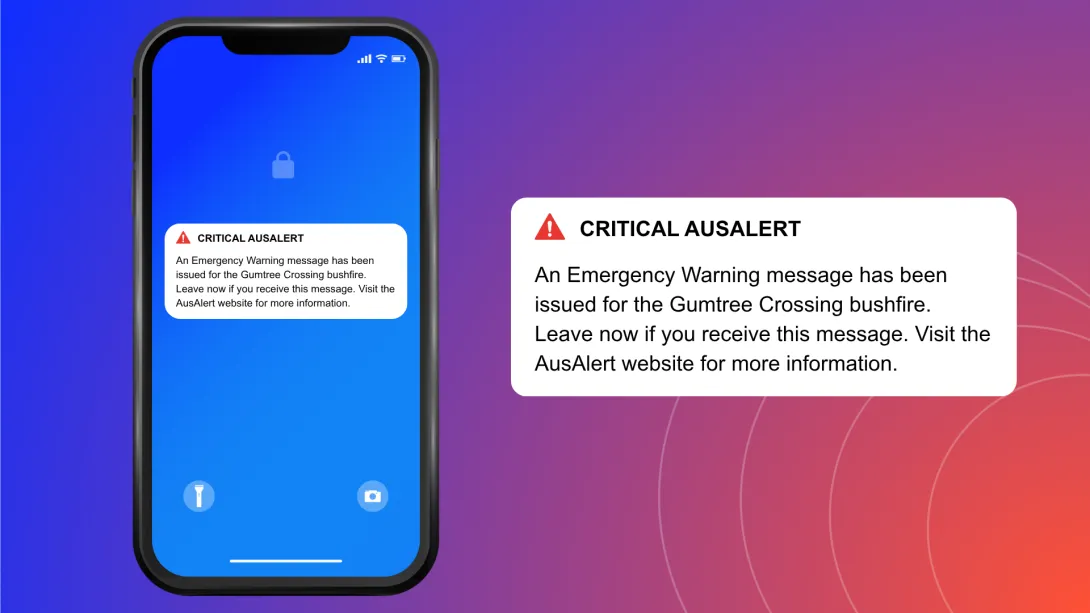
An AusAlert sounds like this:
Alert sound
Receiving an AusAlert
To receive an AusAlert you:
- don’t need to sign up
- don’t need an Australian SIM card or eSIM
- don’t need to download an app.
You may receive an AusAlert if you’re in or near an area affected by a disaster.
Mobile devices from outside Australia are not required to meet Australian telecommunication device standards, so may behave differently to Australian mobile devices when receiving alerts.
If you receive an AusAlert:
- read the message carefully
- ask someone you trust for help if needed
- take a screenshot if you want to translate it
- follow the instructions in the alert message.
If you don’t receive an AusAlert, don't worry. It may be because:
- your device might have been turned off or in aeroplane mode during the alert period
- your device might not be compatible with AusAlert.
Mobile phones made before 2019 may not receive AusAlert messages. If your device uses a prepaid SIM card, you may still receive an AusAlert, even if you have no data left.
Other ways to get emergency information
AusAlert is just one way to stay safe in an emergency.
You can also get emergency information from:
- local radio – the ABC is the official national emergency broadcaster
- television
- social media
- emergency services apps and websites
- friends, family, trusted community members, neighbours and workmates.
It’s important you don’t wait to receive an AusAlert before acting in a disaster.
Why you can trust AusAlert
AusAlert is run by the Australian Government and is safe and secure. Only authorised emergency services organisations and the Australian Government can send AusAlerts.
AusAlert:
- will never ask for your personal or financial details
- does not know or store your personal information
- does not know or store your phone number
- does not track your location
- does not require you to sign up or download an app.
If you receive anything that seems suspicious, you can report it to ScamWatch.
If you don't want to receive some AusAlerts
AusAlerts contain life-saving information and are recommended to be turned on to help keep you safe.
If an AusAlert may cause stress or harm for you or someone you care for, you can choose to turn some AusAlerts off or adjust how they appear and sound.
Find out how to turn off an AusAlert.
If you do this, use other sources to stay updated, such as radio, television or ABC online.