Important AusAlert information
AusAlert messages share important information, but they could make hidden safety devices easier to find.
If you use a concealed or hidden phone to help keep you safe, including because of domestic and family violence, think about whether receiving emergency warnings on that device is right for your situation.
Important: you can still receive AusAlerts if your phone is on ‘silent’ or ‘do not disturb’.
A device that is switched off or in aeroplane mode will not receive AusAlert messages.
If it’s not safe to receive AusAlerts on your devices, keep them turned off or in aeroplane mode until you need them.
You may choose to receive AusAlert messages on your non-hidden mobile device, such as your everyday mobile phone, smart watch or tablet, and keep your hidden device switched off to protect your privacy, safety and battery life.
Choose the option that best supports your personal circumstances and safety needs.
If you are concerned about your immediate safety, call 000.
If you have concerns for your safety and would like further advice or support, you can call 1800RESPECT (1800 737 732).
For Aboriginal or Torres Strait Islander services, call 13YARN (13 92 76).
To access local support, visit Australia's National Research Organisation for Women's Safety.
About AusAlert
AusAlert sends emergency messages to most compatible mobile devices such as phones, tablets and smart watches. Alerts can also be received on children’s safety watches, and Apple CarPlay and Android Auto devices.
AusAlerts are sent to devices in a specific area for a limited time. Devices just outside the target area may also receive the alert.
AusAlert messages are designed to protect against impersonation and scams. AusAlert doesn't collect or store personal or financial information. It can't track or share your location history.
Alert types
There are two types of AusAlerts:
- Critical Alerts are used for the most serious emergencies. You can't turn them off. Your device will alert you even if it’s on ‘silent’ or ‘do not disturb’.
- Priority Alerts are used when there is an increased risk and conditions are changing. They can be turned off.
When you receive an AusAlert, your mobile device will:
- vibrate
- play a loud siren-like sound for about 10 seconds
- turn on the screen to show the message.
An AusAlert looks something like this:
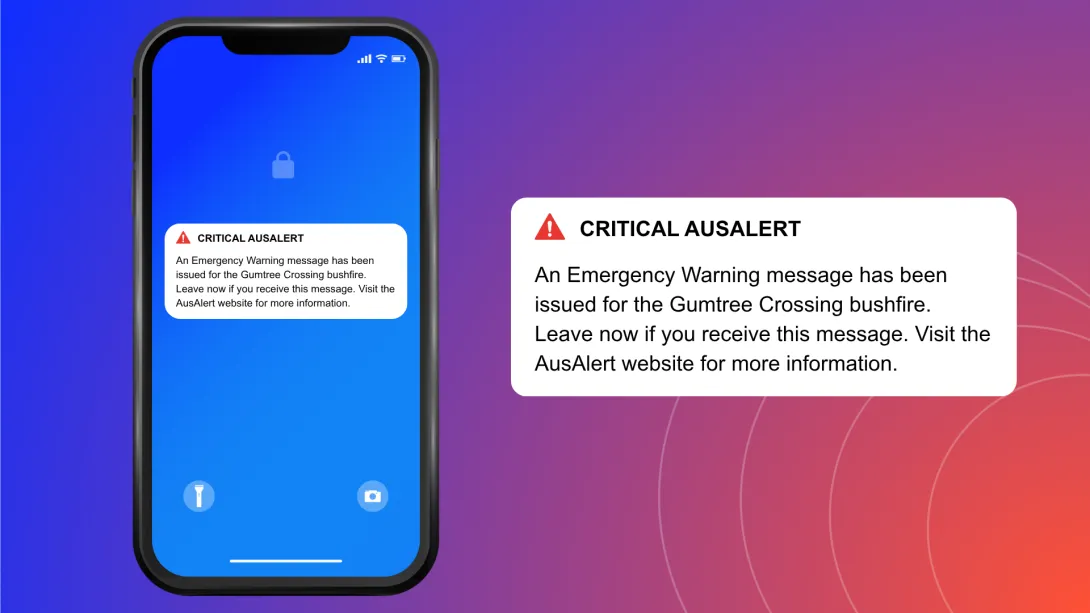
An AusAlert sounds like this:
Other ways to get emergency information
AusAlert is just one way to stay safe in an emergency.
You can also get emergency information from:
- local radio – the ABC is the official national emergency broadcaster
- television
- social media
- emergency services apps and websites
- friends, family, trusted community members, neighbours and workmates.
It’s important you don’t wait to receive an AusAlert before acting in a disaster.
If you don't want to receive some AusAlerts
AusAlerts contain life-saving information and are recommended to be turned on to help keep you safe.
If an AusAlert may cause stress or harm for you or someone you care for, you can choose to turn some AusAlerts off or adjust how they appear and sound.
Find out how to turn off an AusAlert.
If you do this, use other sources to stay updated, such as radio, television or ABC online.