AusAlert information for parents, carers and students
Children and teenagers need clear, calm and accessible information during emergencies. They may need help from parents, teachers or carers to understand what is happening and what to do.
AusAlert messages may appear on children's phones, tablets and smartwatches. Parents, carers and guardians should help children understand:
- what AusAlert is
- what alerts mean
- what to do if they receive an alert.
Some young people may find emergency messages distressing or confusing and may need extra support.
This could include:
- infants and young children
- children with learning difficulties, or sensory or communication needs
- children who are still learning to read and understand written information
- children who are not with their primary carer
- young people who are not with a responsible adult when they receive an AusAlert.
Young people receiving an AusAlert
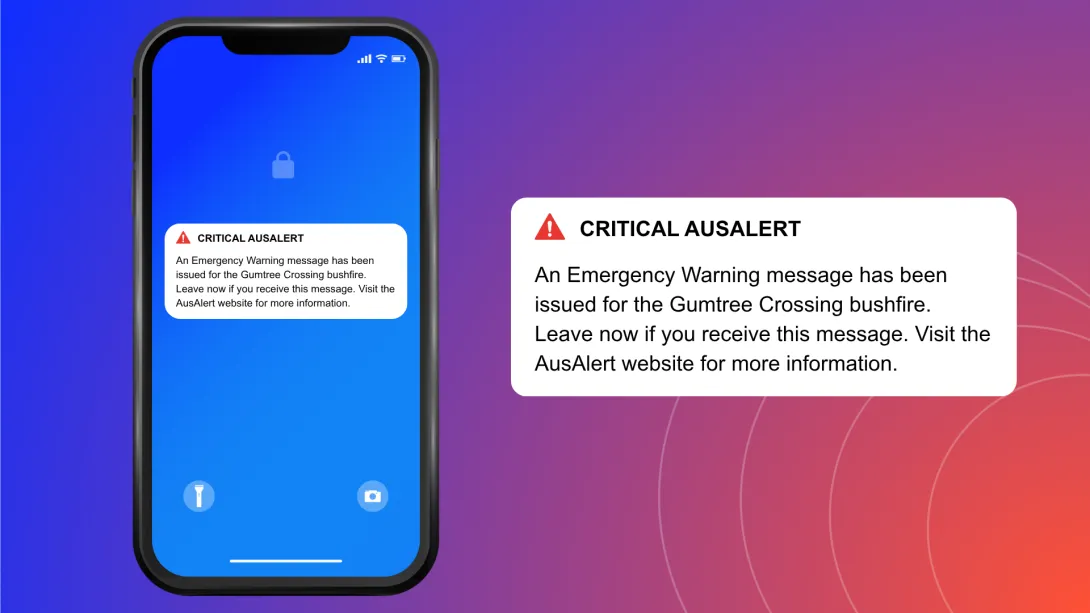
AusAlert sends near-instant emergency messages to compatible mobile devices such as mobiles, tablets, smartwatches and children’s safety watches. This helps you get information quickly.
AusAlerts use sound, vibration and on-screen messages to get your attention.
Alerts look and sound different from a standard text message (SMS). They can alert you even if your device is on ‘silent’ or ‘do not disturb’.
Exactly how it appears will depend on your device type and operating system.
An AusAlert looks something like this:
An AusAlert sounds like this:
Alert sound
Tell young people to:
- read the message carefully
- ask a teacher, trusted adult or carer for help if needed
- follow the instructions in the message.
If they are at school, they should follow instructions from their teachers.
AusAlert information for schools
Schools should be prepared if an alert is sent during school hours.
The best way to help students stay calm and safe is to explain AusAlert before an emergency happens. You can do this in classrooms or at whole‑school assemblies.
Make sure:
- staff and students understand what AusAlert is
- staff and students know what to do if they receive an alert
- schools include AusAlert in their emergency, lockdown and evacuation plans.
In daycare, preschool and primary school, AusAlerts may appear on classroom tablets and smart watches. These devices may vibrate and make a loud siren‑like sound.
In secondary schools, colleges and universities, students may receive an AusAlert on their phones, tablets or smart watches. These devices may also vibrate and make a loud siren‑like sound.
During an emergency, families and schools should also use trusted local sources of information such as:
- school or community instructions and evacuation plans
- local radio – the ABC is the official national emergency broadcaster
- television
- local emergency services.
It’s important you don’t wait to receive an AusAlert before acting in a disaster.
If you don't want to receive some AusAlerts
AusAlerts contain life-saving information and are recommended to be turned on to help keep you safe.
If an AusAlert may cause stress or harm for you or someone you care for, you can choose to turn some AusAlerts off or adjust how they appear and sound.
Find out how to turn off an AusAlert.
If you do this, use other sources to stay updated, such as radio, television or ABC online.