

Travel safe with AusAlert
You may receive an AusAlert while driving, riding or using public transport.
AusAlerts use vibration, sound and on-screen messages to get your attention. They may alert you even if your device is on ‘silent’ or ‘do not disturb’.
Drivers and riders
If you receive an AusAlert while driving or riding, stay calm and don’t touch your device. Mobile phone laws still apply – don't read or respond to the alert while moving. Only check the message when your vehicle is turned off and it is safe and legal to do so.
Public transport users
If you receive an alert while on public transport, stay calm and:
- read the AusAlert
- follow the instructions or announcements of public transport staff
- don't approach the driver about the alert.
When you leave the vehicle, follow the instructions in the AusAlert.
Receiving an alert
AusAlert sends near‑instant emergency messages to compatible mobile devices like phones, tablets and smart watches.
The alert may play through your vehicle’s speakers using Apple CarPlay, Android Auto or Bluetooth. It may interrupt any navigation or media like music or podcasts.
An AusAlert looks something like this:
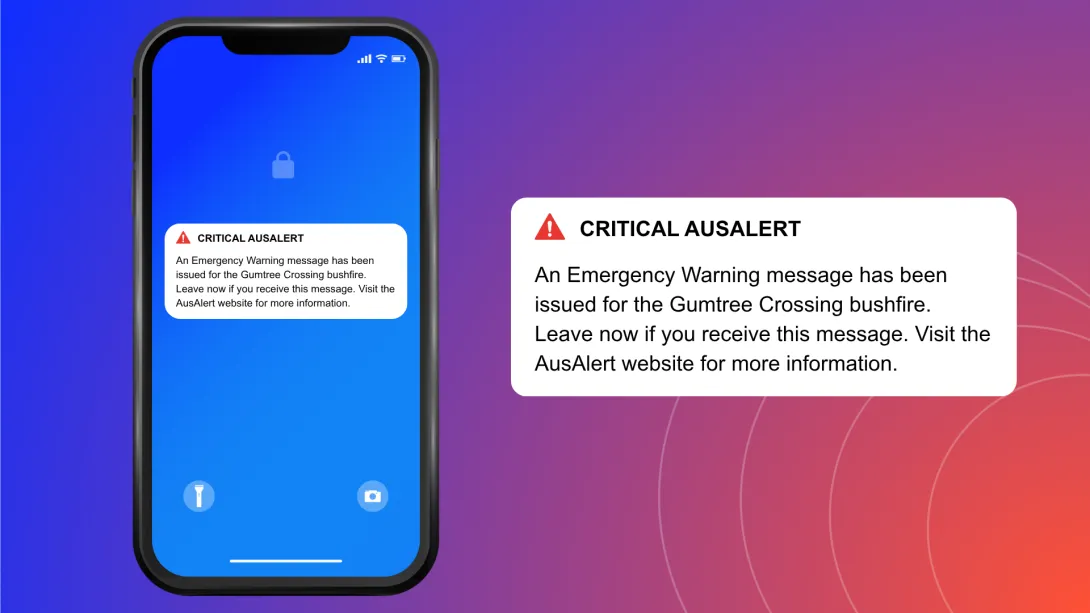
An AusAlert sounds like this:
Alert sound
Other ways to get emergency information
AusAlert is just one way to stay safe in an emergency.
You can also get emergency information from:
- local radio – the ABC is the official national emergency broadcaster
- television
- social media
- emergency services apps and websites
- friends, family, trusted community members, neighbours and workmates.
For more information about an emergency while driving or riding:
- use your car radio for news and traffic updates
- pay attention to any road signs.
It’s important you don’t wait to receive an AusAlert before acting in a disaster.
If you don't want to receive some AusAlerts
AusAlerts contain life-saving information and are recommended to be turned on to help keep you safe.
If an AusAlert may cause stress or harm for you or someone you care for, you can choose to turn some AusAlerts off or adjust how they appear and sound.
Find out how to turn off an AusAlert.
If you do this, use other sources to stay updated, such as radio, television or ABC online.
