AusAlert and accessibility
People with disabilities may face different challenges in an emergency.
AusAlert sends near-instant emergency messages to compatible mobile devices like phones, tablets and smart watches. This helps you get information quickly.
AusAlert helps keep you informed, which can help you:
- prepare, move or evacuate earlier
- follow your personal emergency plan, arrange support or use mobility aids safely
- make decisions to stay safe.
AusAlerts use sound, vibration and on-screen messages to get your attention.
Alerts may include a 10-second siren-like sound. Some people may find this sound loud or distressing, including people with sensory sensitivities.
An AusAlert looks something like this:
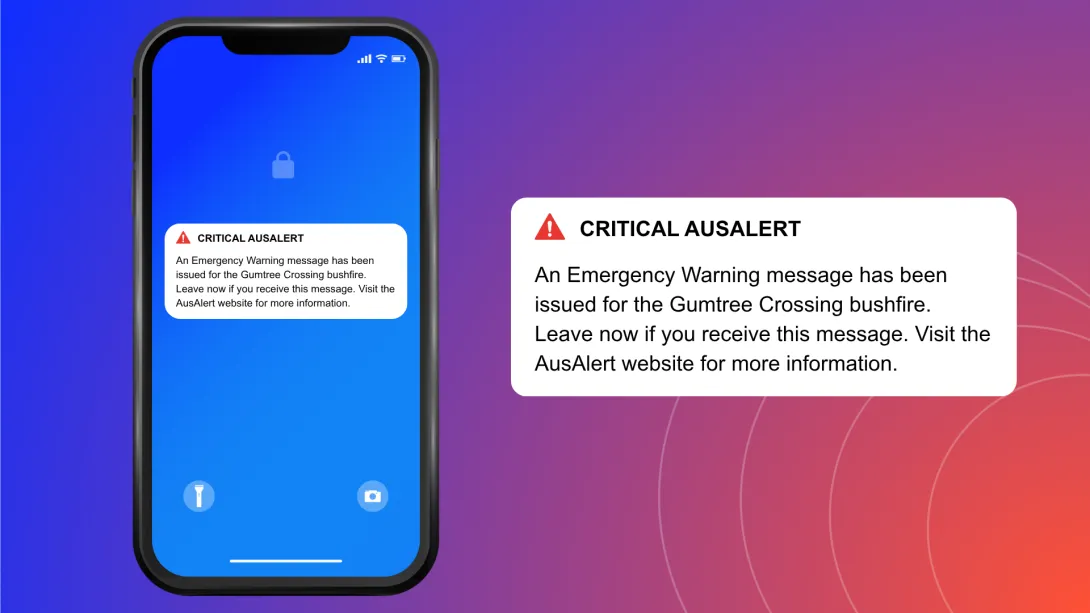
An AusAlert sounds like this:
Alert sound
Some people may:
- find alerts hard to see, hear, feel or understand
- feel overwhelmed when alerts appear suddenly
- prefer information repeated, explained slower or in another format.
Deaf community members
If you are d/Deaf or hard of hearing, AusAlert may:
- vibrate your device and turn on your screen
- be heard through hearing aids or cochlear implants
- work with other assistive technologies, such as bed shakers.
People who are blind or have low vision
If you are blind or have low vision, AusAlert may:
- read the message aloud if text-to-speech is turned on
- work with other assistive technologies such as refreshable braille displays and screen magnification tools.
Receiving an AusAlert
In a disaster, you may receive an AusAlert if you have a compatible mobile device.
If you receive an AusAlert:
- read the message carefully
- ask someone you trust for help if needed
- follow the instructions in the alert message.
If you don’t receive an AusAlert, it may be because:
- your device might have been turned off or in aeroplane mode during the alert period
- your device might not be compatible with AusAlert
- you are not in the area near to the emergency.
Some devices made before 2019 may not receive AusAlerts. If you’re not sure how to find out when your mobile device was made, ask a carer, family member or someone you trust for help.
Other ways to get emergency information
AusAlert is just one way to stay safe in an emergency. If you have a landline, you may also receive a message.
You can get additional emergency information from:
- local radio – the ABC is the official national emergency broadcaster
- television
- social media
- emergency services apps and websites
- carers, family, friends, trusted community members, neighbours and workmates.
It’s important you don’t wait to receive an AusAlert before acting in a disaster.
Why you can trust AusAlert
AusAlert is run by the Australian Government and is safe and secure. Only authorised emergency services organisations and the Australian Government can send AusAlerts.
AusAlert:
- will never ask for your personal or financial details
- does not know or store your personal information
- does not know or store your phone number
- does not track your location
- does not require you to sign up or download an app.
If you receive anything that seems suspicious, you can report it to ScamWatch.
If you don't want to receive some AusAlerts
AusAlerts contain life-saving information and are recommended to be turned on to help keep you safe.
If an AusAlert may cause stress or harm for you or someone you care for, you can choose to turn some AusAlerts off or adjust how they appear and sound.
Find out how to turn off an AusAlert.
If you do this, use other sources to stay updated, such as radio, television or ABC online.